
Best Image Formats for Background Removal (Complete Guide)
Choosing the correct image format is crucial for successful background removal. The wrong format can cause quality loss, jagged edges, or transparency issues.
Why Image Format Matters
Image formats affect:
-
Background removal accuracy
-
Image clarity
-
Transparency support
-
File size and loading speed
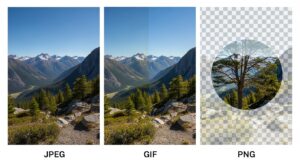
Most Common Image Formats Explained
JPG (JPEG)
Pros
-
Small file size
-
Widely supported
Cons
-
No transparency
-
Compression artifacts
Best for: Original photos before background removal
PNG
Pros
-
Supports transparency
-
High quality
-
Sharp edges
Cons
-
Larger file size
Best for: Final images with transparent backgrounds

WebP
Pros
-
Smaller file size than PNG
-
Supports transparency
-
Ideal for websites
Cons
-
Limited compatibility on older systems
Step-by-Step: Choosing the Right Format
-
Upload original image (JPG or PNG)
-
Remove background
-
Export as PNG or WebP
-
Optimize for web use
Practical Tips
-
Avoid JPG after background removal
-
Use PNG for editing
-
Use WebP for websites
Final Thoughts
Selecting the right image format ensures cleaner edges, proper transparency, and better performance across digital platforms.
For More: Background Remover for Social Media Images