


Best Image Formats for Background Removal (Complete Guide)
Best Image Formats for Background Removal: Choosing the correct image format is crucial for successful background removal. The wrong format can cause quality loss, jagged edges, or transparency issues.
Why Image Format Matters
Image formats affect:
-
Background removal accuracy
-
Image clarity
-
Transparency support
-
File size and loading speed
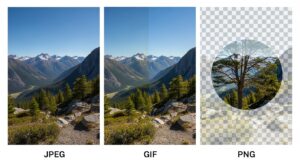

Most Common Image Formats Explained
JPG (JPEG)
Pros
-
Small file size
-
Widely supported
Cons
-
No transparency
-
Compression artifacts
Best for: Original photos before background removal
PNG
Pros
-
Supports transparency
-
High quality
-
Sharp edges
Cons
-
Larger file size
Best for: Final images with transparent backgrounds


WebP
Pros
-
Smaller file size than PNG
-
Supports transparency
-
Ideal for websites
Cons
-
Limited compatibility on older systems
Step-by-Step: Choosing the Right Format
-
Upload original image (JPG or PNG)
-
Remove background
-
Export as PNG or WebP
-
Optimize for web use
Practical Tips
-
Avoid JPG after background removal
-
Use PNG for editing
-
Use WebP for websites
Final Thoughts
Selecting the right image format ensures cleaner edges, proper transparency, and better performance across digital platforms.
For More: Background Remover for Social Media Images